Calling Lua functions in nested folders from Storyboard

The Lua Callback Action allows you to point to a global function located within a Lua file at the root of your project’s scripts directory. Global functions that live within sub-directories in scripts/ are not accessible through the Lua Callback Action; you will not find these in the dropdown or when you expand to the Advanced Function list. This was a change that came after Storyboard version 5.3. Lua files that are not in the root of scripts/ are not loaded by Storyboard by default. If you find yourself trying to call a global function from a scripts/ sub-directory, there are two options around this.
Note: The order in which Storyboard loads files in scripts/ is determined by the OS filesystem. For deterministic loading, use Lua require() statements.
1. Invoke Module
It is a best practice to keep the number of global Lua functions to a minimum and adopt a modular approach when possible. Reducing the global scope leads to cleaner and easier to maintain code, as well as lowers performance overhead.
A way to reduce the need for global Lua functions is to implement a callback utility we internally at Crank refer to as the “invoke module”. This is a global Lua callback that is used to re-direct callbacks from the Storyboard app to local Lua modules.
You can pass in custom arguments with the Lua Action that appear in the callback function’s mapargs table. Those arguments can be the names of other functions, or items like methods/managers that help identify where to direct the incoming callback.
When you call a Lua function from another script, make sure the dependent file is initialized ahead of time and loaded in by using require() statements.
Attached to this article is an example project showcasing the invoke_module utility that is commonly used by Crank’s Professional Services team. Here is a guide to implementing this utility in your project.
Boilerplate Code:
lua
-- We like to name the script the same name as the module:
-- scripts/folder/module.lua

local module = {} -- A module is a table

function module:method(mapargs)
  -- A method is a function attached to the module table

  -- Attaching the function with a colon passes reference
  -- to the self variable:
  self.example = 'this is a self variable'
end

return module -- Return the module at the end of the file
Once you have your code set up like this, we make sure the invoke.lua script attached to this guide is in the root of our scripts directory: scripts/invoke.lua. This gives us access to the global function in this file via Storyboard.
Next, when binding a Lua Script action to a trigger in the Storyboard, you must add two arguments:
- module: folder.module
This is the path to your Lua file with scripts as the root, if you named the file something else you must use it here so [folder name].[file name]
If you have you folder nested in another folder, you would add it like so:
folder.another_folder.module
- method: method
In our example above, this would call the function method()
Any additional arguments or Storyboard mapargs are passed along to the method and can be unpacked via mapargs.[name of other argument]
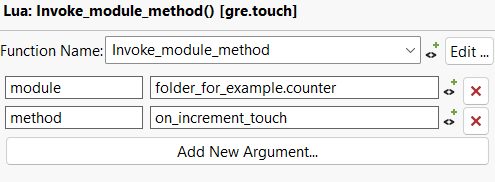
function Invoke_module_method(mapargs)
  local module_name = mapargs.module
  local method_name = mapargs.method

  invoke:invoke_method(module_name, method_name, mapargs)
end
2. Build Path
If you do have a global function in a subdirectory that you would like to be called directly from a Storyboard Action, you can add a folder to your Project’s Build Path. To do this navigate to your Project Explorer > Right Click on your Project > Properties > Lua > Build Path > Source > Add Folder. This will allow your functions to be findable in the Lua Callbacks dropdown, but you will still receive an error when trying to access those functions.
Just like with invoking function calls in Lua, you will need to load in those scripts by initializing them using require() statements. Make sure you require the needed Lua scripts before you try and access them from your application. Having an Init() function triggered on an event such as Application Start or Screenshow Pre is common practice.
Comments
Please sign in to leave a comment.